
Installing Watch Faces: A Step-by-Step Guide
There are two ways to install a watch face:
1. Using the Google Play Store on your phone:
- Step 1: Open the companion app for your watch face.
- Step 2: Tap the “Download” button at the bottom of the screen.
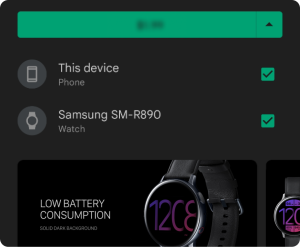
Alternatively, you can go directly to the watch face’s Play Store listing and download it from there. - Step 3: During installation, make sure the app is installed on both your phone and your watch, as shown below.
2. Installing directly on your watch:
- Step 1: Open the companion app on your watch.
- Step 2: Ensure your watch is connected to your phone, as shown below.
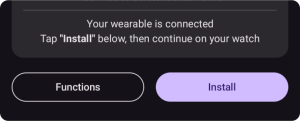
- Step 3: Tap the “Install” button.
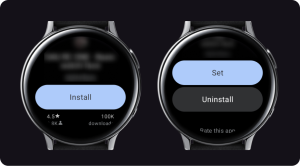
- Step 4: Check your phone and tap “Install” again. If you’ve already installed the watch face, you can tap “Set” to apply it to your watch.
Troubleshooting:
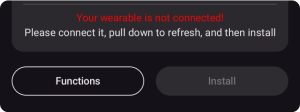
If your watch is disconnected, check your connection, pull down to refresh, and then tap the “Install” button.
Troubleshooting Payment Issues:
- If you encounter a payment loop (being asked to pay repeatedly), it might be due to a temporary sync issue between your device and Google’s servers. Try these steps:
- Disconnect and reconnect your watch from your phone.
- Toggle “Airplane mode” on your watch on and off.
- Rest assured, you’ll only be charged once, even if prompted multiple times. Duplicate payment requests are automatically canceled.